The same wedding timeline, built in a Google Doc and in Daymarked.
A Google Doc is free, you already know how to use it, and it has carried a lot of photographers through a lot of weddings. I built mine in a Word template for years. So this page isn't about why your doc is bad. It's one wedding, built both ways, so you can see where the work goes and decide whether it's worth changing.
Three weeks out, the venue pushes the ceremony to 4:30.
Wedding Day Timeline
Saturday · Ceremony was 4:00 now 4:30 PM
…and 6 more rows
was 4:00–4:30now 4:30–5:00Ceremonywas 4:30–5:30now 5:00–6:00Cocktail hourwas 5:30–5:35now 6:00–6:05Grand entrancewas 5:35–6:40now 6:05–7:10Dinnerwas 6:40–7:00now 7:10–7:30Golden hour portraitswas 7:00–7:15now 7:30–7:45Toastswas 7:15–7:20now 7:45–7:50First dancewas 7:20–7:30now 7:50–8:00Parent dances
Sunset is 7:18. Nothing here says the portraits now run past it.
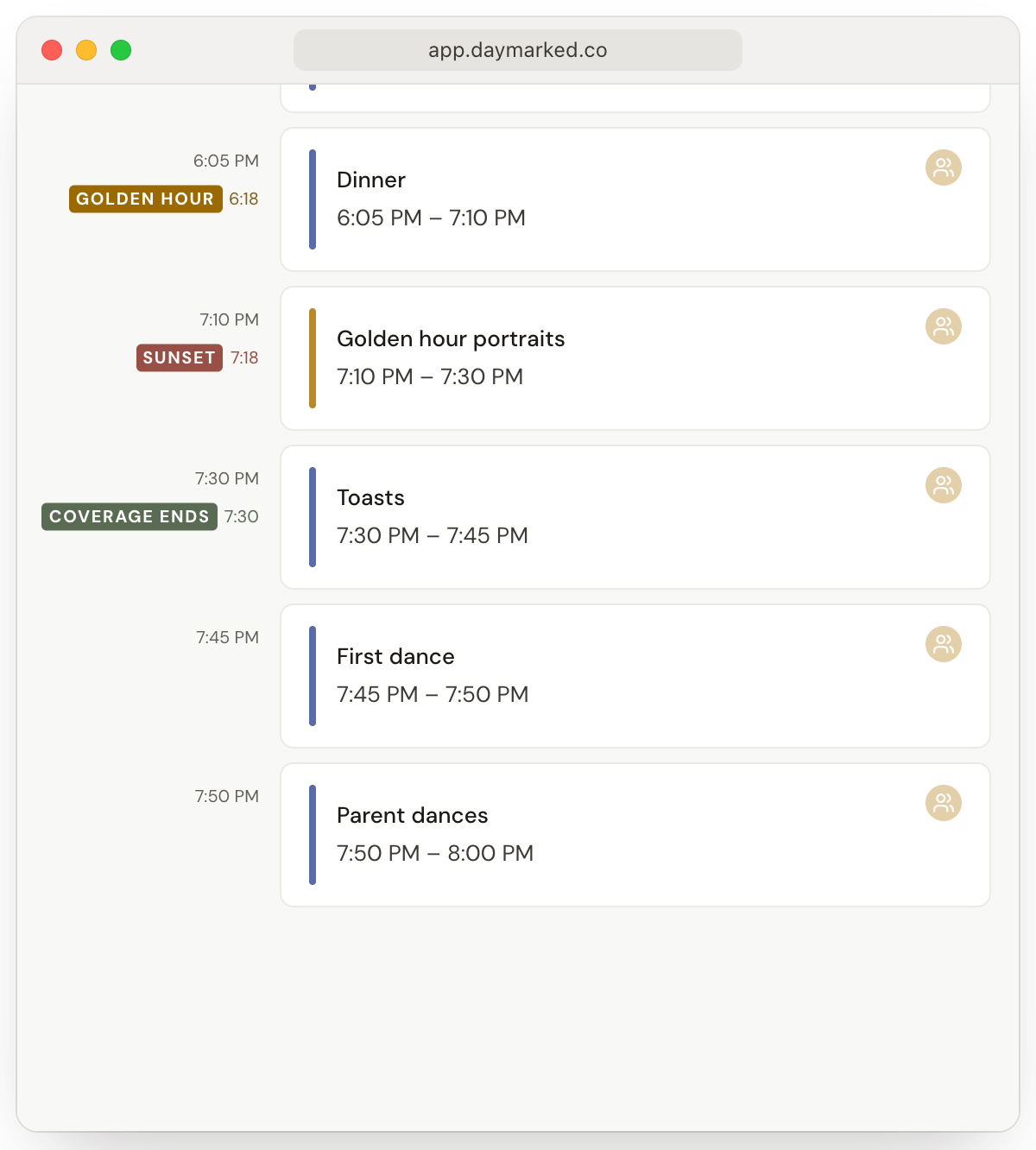
Every row moves, so you retype all 14, start and end. Now look at the golden hour portraits. They were 6:40 to 7:00. They're now 7:10 to 7:30, and sunset is still 7:18. Most of that portrait time is after the sun is down, and nothing in the doc says so. You catch it or you don't.
Then come the copies. If you sent PDFs, you export again, send again, and hope everyone opens the new one. If you shared the link, your couple's copy is current, and the second doc with your notes is one more thing to update.
Select all, press the down arrow twice, and confirm. Each press moves the selected blocks 15 minutes. Sunset stays at 7:18, because the sun didn't move, and it's now marked inside the portraits block. Your booked hours didn't move either: coverage now ends as the toasts begin, so the toasts, the first dance, and the parent dances fall outside the hours you're booked for. Move the portraits back into the light, then move your coverage or talk to the couple about more hours. Every link shows the new day, with the date it was last updated at the bottom. Nobody gets a new file.
A PDF you printed last week is still last week's, in either tool.
For more on late changes, see how to handle timeline revisions.
First wedding is free, no credit card required.
The rest of the day, side by side
Typed across, or typed in once
Doc: Answers in one window, the doc in the other, typed across.
Daymarked: Your couple fills in address and time fields, and the answers land on the wedding.
Fourteen rows by hand, or a starting day
Doc: Work backwards from 4:00 yourself, a start and an end on every row.
Daymarked: Build Timeline places the ceremony and fills in the blocks around it.
Looked up, or already there
Doc: Sunset from one tab, the drive from Maps, both typed in.
Daymarked: Sunset marked for the venue and date, and the drive offered between stops.
A second doc, or one click
Doc: Copy the names over and write the groupings.
Daymarked: Built from the family your couple entered, with their names in the shot titles.
One doc for everyone, or a version each
Doc: Everyone with the link sees the same document.
Daymarked: Your couple, your team, and the wedding party each get their own link.
A printout, or two phones
Doc: Opens offline only if you set that up ahead of time.
Daymarked: Once it's been opened, it opens with no signal, and the formals check off on two phones.
Side by side
Cost
- A Google Doc
- Free with a Google account
- Daymarked
- First wedding free. Then three weddings for $27 ($9 each, credits never expire), or $129 a year for unlimited.
Your couple's details
- A Google Doc
- Typed across from wherever they sent them
- Daymarked
- Typed fields your couple fills in, or a response from HoneyBook or Dubsado uploaded as a PDF or spreadsheet
Times
- A Google Doc
- Typed by hand. Google's formulas live in Sheets.
- Daymarked
- Built backwards from the ceremony. A block you drag takes its time from the blocks around it.
Sunset and golden hour
- A Google Doc
- Looked up somewhere else and typed in
- Daymarked
- Marked for the venue and the date
Drive time
- A Google Doc
- A place chip opens Maps directions beside the doc. You type the time in.
- Daymarked
- Offered between stops, added in one click
Family formals list
- A Google Doc
- A second doc, written by hand
- Daymarked
- One click from your couple's family list
What your couple sees
- A Google Doc
- The doc you see, or a PDF
- Daymarked
- A read-only link that stays current, without your internal notes
Versions for other people
- A Google Doc
- A copy of the doc for each one
- Daymarked
- Up to 10 versions a wedding, each with its own link and PDF
Comments
- A Google Doc
- Yes, for anyone you give comment access
- Daymarked
- Yes, for couples you invite by email
Without signal
- A Google Doc
- Works if offline access was set up ahead of time
- Daymarked
- A link opened once still opens. Shot list check-offs save on the phone and send later.
Anything that isn't a wedding day
- A Google Doc
- Yes
- Daymarked
- No
Layout
- A Google Doc
- Anything you want
- Daymarked
- Your logo, colors, and fonts. You choose which sections show.
Google Docs details checked November 26, 2026. Sources are at the bottom of the page.
When a Google Doc is still the right call
- You shoot a handful of weddings a year and your template already works. Free forever is hard to argue with.
- A planner owns the timeline and you only need to read it.
- You're planning something that isn't a wedding day. Daymarked's blocks are a wedding's blocks.
- You want a layout that's entirely your own.
For me it was never that the doc was hard. It was typing the same answers across, doing the same arithmetic again, and not being sure which version anyone had. If none of that bothers you, keep the doc. If it does, run your next wedding through Daymarked. The first one is free.
First wedding free, no credit card. After that, three weddings are $27, which is $9 each, and the credits never expire. No subscription. Or $129 a year for unlimited. See pricing
Frequently asked questions
Yes. Share the link instead of a PDF and your couple sees the latest doc every time. What a doc can't do is show different people different versions of the same day. Your notes, your second shooter's copy, and the wedding party's short version are separate documents, and you keep them in step by hand.
Maybe not. The first wedding is free, so the honest test is to build one and see. After that it's $9 a wedding in a pack of three, and the credits never expire, so there's no rush to use them. If your doc is quick and has never bitten you, keep it.
Not the document itself. What carries over is how you time a day. Set the length of each block once, your first look, your family photos, your buffer, and Build Timeline uses those lengths on every wedding after.